BirdBrain is part of the CreXo family of brands!
Learn MoreBirdBrain is part of the CreXo family of brands!
Learn MoreChoosing the best Study Furniture for students is less about buying a matching set. It is about creating a comfortable place to focus, write, read, and use a screen. A desk with enough clear space and a supportive chair can make long assignments easier. Good lighting matters too; a lamp should brighten notes without casting glare on a laptop. Small details count. A bag hook, drawer, or footrest may keep clutter from spreading across the work surface. Yet even a carefully arranged room cannot remove every distraction or guarantee better grades. That distinction matters.
This guide explores Study Furniture through practical factors: desk size, chair support, storage, lighting, adjustability, and budget. Instead of naming one setup as perfect for everyone, it considers room limits, study habits, and everyday comfort. A student in a small bedroom may need a compact desk near the wall; someone using textbooks and a monitor may need more surface space. Measuring the room and checking chair height can offer more useful clues than attractive product photos alone. A chair may look supportive and still feel uncomfortable after an hour. I may be giving furniture too much credit here: routines, breaks, and sleep also influence concentration. The aim is practical, not perfect. Use these points to find a setup that fits your space now and can adapt as your needs change.
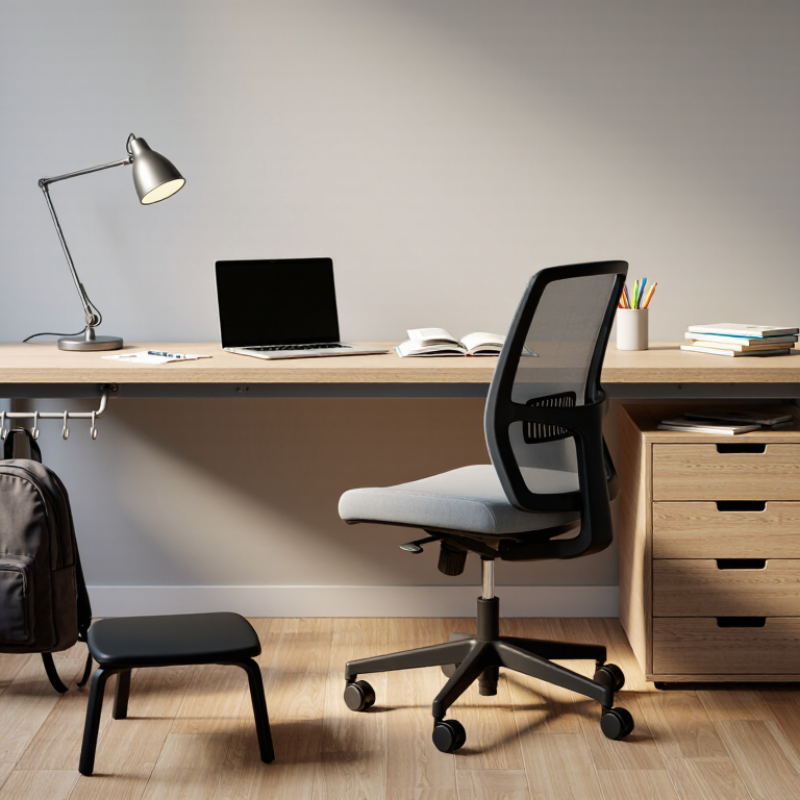
Start with the work, then measure the room. A student who mainly uses a laptop needs less desk depth than someone spreading out textbooks, notebooks, and a lamp. Measure the wall, doorway, and chair clearance before buying. Measure twice. The U.S. Environmental Protection Agency estimates that people spend about 90% of their time indoors, so keeping the study area comfortable and well ventilated matters. Avoid placing furniture where it blocks a window, vent, or walking route.
Fit the chair and screen to the student, not just the floor plan. Cornell University’s ergonomics guidance recommends placing a monitor roughly 18–30 inches from the eyes, with its top near eye level. An adjustable chair can help accommodate growth and different users, while a compact desk may suit a narrow bedroom. But compact can become cramped. A neat layout on paper may still feel awkward once books and cables are in place.
A good study setup begins with the chair, not the desk. Adjust the seat until both feet rest flat on the floor and your thighs sit level, roughly parallel to it. OSHA’s Computer Workstations eTool recommends this posture and suggests a footrest when the chair cannot be lowered enough. Keep your back supported, shoulders relaxed, and elbows close to your body. Then set the desk height so your forearms can rest comfortably without lifting your shoulders. A stack of books can raise a laptop screen, but it should not force your neck to bend for hours.
Small changes matter. The U.S. Bureau of Labor Statistics reported 272,780 workplace musculoskeletal disorder cases involving days away from work in 2018, about 30 percent of such cases. That figure concerns workers, not students, so it cannot predict study-related injuries. Still, it underscores why a cramped posture deserves attention. Check your setup after sitting for ten minutes: are your feet still grounded, and are your thighs level? A chair that fits today may feel wrong at a different desk. And posture is not a fixed pose; standing up and moving regularly still matters. Sources: OSHA, Computer Workstations eTool; U.S. Bureau of Labor Statistics, 2018 nonfatal injury and illness data.
| Furniture or setup factor | Fit target | What to look for | Practical adjustment |
|---|---|---|---|
| Study chair | Adjustable seat height lets the student sit with feet supported and thighs approximately level. | A stable chair with a height-adjustable seat; a backrest that supports the lower back is useful for longer study sessions. | Adjust the seat after sitting in usual study footwear. Avoid choosing by age alone; students of the same age can need different chair heights. |
| Feet and foot support | Feet rest flat on the floor or on a footrest, without dangling or pressing uncomfortably into the seat edge. | A footrest can help when raising the chair is necessary to reach the desk comfortably but leaves the feet unsupported. | Use a stable, non-slip footrest or firm support. Adjust its height so the feet are supported and the thighs remain approximately level. |
| Thighs and knees | Thighs are approximately parallel to the floor, with knees around hip level and room to move. | A seat that does not press sharply behind the knees; enough open space below the desk for comfortable leg movement. | If the seat depth is not adjustable, check that the student can sit back while leaving a small gap between the seat edge and the back of the knees. |
| Desk height | The work surface allows relaxed shoulders and comfortable forearm positioning while seated upright. | A desk height that works with the adjusted chair; an adjustable desk can accommodate growth and different tasks. | Set the chair and foot support first, then assess the desk. If the desk is too high, consider a keyboard tray or another suitable work surface rather than raising the shoulders. |
| Desk surface and legroom | Enough space for study materials, with clear space beneath the desk for knees, legs, and foot movement. | A surface suited to the student’s equipment and tasks; drawers or supports should not block the seated position. | Check the actual under-desk clearance with the chair in place. Keep frequently used items within easy reach to limit repeated twisting and stretching. |
| Laptop or monitor position | The screen is positioned to reduce prolonged neck bending; the keyboard and pointing device can be used with relaxed shoulders. | For extended laptop work, a separate keyboard and pointing device allow the screen to be raised without raising the hands to an awkward position. | Center the screen in front of the user and adjust it for a comfortable viewing posture. Recheck posture when switching between reading, writing, and typing. |
| Best overall match | Chair and desk work together: feet supported, thighs approximately level, shoulders relaxed, and adequate legroom. | Prioritize adjustability and a real seated fit over a fixed “student-size” label or appearance. | Reassess the setup as the student grows or changes footwear, chair, desk, or equipment. |
| Fit note: OSHA workstation guidance supports keeping feet flat on the floor or on a footrest and thighs approximately parallel to the floor. These are posture checks, not one-size-fits-all furniture dimensions; individual fit and comfort should guide adjustments. | |||
What Is the Best Study Furniture for Students?
A comfortable study space starts with a screen you can view without leaning forward. OSHA’s Computer Workstations eTool recommends placing the monitor about 20–40 inches from your eyes. That range matters. Set the screen directly ahead, with its top at or slightly below eye level, to reduce repeated neck tilting. Cornell University’s ergonomics guidance also advises arranging the monitor around arm’s length away. These are practical guidelines, not a guarantee that every setup will feel right.
Choose a desk deep enough to hold the screen at that distance while leaving room for books, a keyboard, and your forearms. A stable chair helps, too; adjust it so your feet rest on the floor or a footrest. Check the distance while seated, not while standing beside the desk. Small shifts matter. A tape measure is more reliable than guessing, especially when a laptop sits close to the edge. If text looks tiny at 20 inches, enlarge it rather than pulling your head forward. The setup may still need tweaking. That is normal.
A practical screen-distance range for setting up a student study space
How to use this range: Position the screen about 20–40 inches from your eyes, then adjust for comfortable, clear viewing. This is a practical ergonomic guideline, not a fixed distance that suits every student or task.
ANSI/BIFMA G1 is an ergonomics guideline that uses human body measurements to inform furniture fit. It is not a single set of dimensions that works for every student. Look for a chair and desk with useful adjustment, especially if several people share the study space. A chair should let the student sit back with feet supported and shoulders relaxed. If feet dangle, add a stable footrest rather than raising the desk unnecessarily.
Adjust the work surface so forearms can rest comfortably while writing or typing. Leave enough room beneath the desk for knees and legs to move; drawers should not force a cramped posture. A screen should sit near eye level and about an arm’s length away, with text large enough to read without leaning forward. Small changes matter. Check the fit again after the student has worked for a while, not only during a quick showroom-style test.
G1 can guide choices, but it cannot replace observing the actual student, chair, and room together. Bodies grow, habits vary, and a setup that looks correct may still feel awkward. That is worth reconsidering. Choose adjustments the student can make easily, and reassess them as height, tasks, or equipment change.
For a student chair, comfort matters, but the frame must withstand daily movement. ANSI/BIFMA X5.1-2017 evaluates general-purpose office chairs through strength, stability, and durability tests. Its seat durability test runs for 100,000 cycles, repeatedly loading the seat to simulate use over time. That is useful evidence—not a guarantee that every chair will last equally long. Check that the test report names the exact chair model and standard edition. A vague “tested to BIFMA” claim is harder to verify.
In a small study corner, a chair may scrape across the floor, swivel between a desk and shelf, and carry a backpack on its seat. These habits can stress joints and upholstery differently from controlled lab tests. Still, a chair that passes X5.1 testing has met defined performance checks. It cannot prevent damage from rough handling or poor assembly.
Tips: Ask for the full test report, not just a pass label. Check the base, casters, and fasteners for looseness after assembly. Sit and adjust the chair before buying, if possible. A little wobble matters. And lab results do not tell you whether the seat feels right after a two-hour study session.
To provide the best experiences, we use cookies to store and/or access device information. Consenting to these technologies will allow us to process data such as browsing behavior or unique IDs on this site. Not consenting or withdrawing consent, may adversely affect certain features and functions.